The AI landscape has split into two worlds. On one side, cloud providers like Anthropic (Claude), OpenAI (ChatGPT), and Google (Gemini) offer frontier intelligence through APIs. On the other, open-weight models from Meta (Llama), Alibaba (Qwen), Google (Gemma), and Mistral AI now run on hardware you own - your laptop, your server, even your phone.
For business leaders, the question is no longer “should we use AI?” but “where should the AI run, and what trade-offs are we making?”
This guide is a practical, experience-driven comparison. We cover what each approach is good at, what hardware you actually need, how to install everything on Windows, macOS, and Linux, and - because the technology moves fast - how to run a language model on a mobile phone with a working demo.

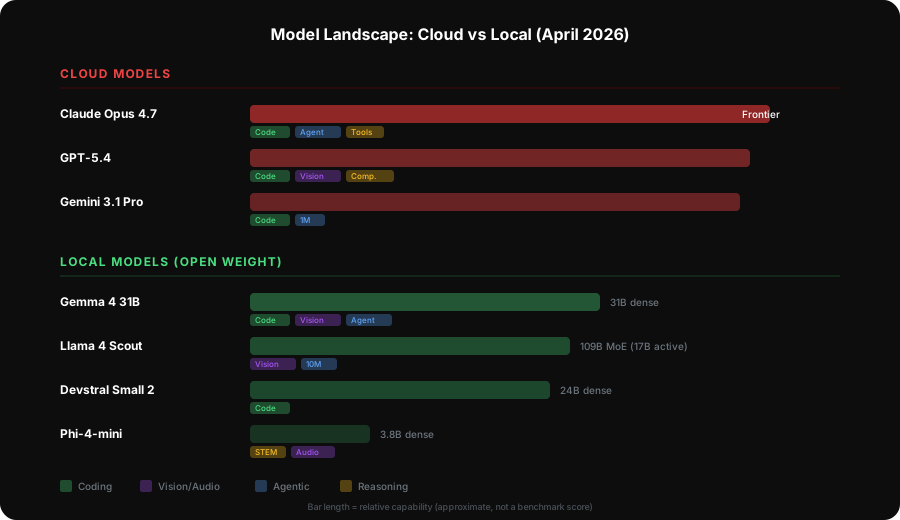
The Models: What Is Available Today (April 2026)
Cloud-Based Models (API Access)
These models run on the provider’s infrastructure. You send data via API, receive results, and pay per token.
| Provider | Key Models | Context Window | Strengths |
|---|---|---|---|
| Anthropic | Claude Opus 4.7, Claude Sonnet 4.6, Claude Haiku 4.5 | 200K-1M tokens | Agentic coding (Opus 4.7), instruction following, tool use, long-context fidelity |
| OpenAI | GPT-5.4, GPT-5.3, GPT-5.4-mini | 1M tokens | Coding, computer use, tool search, multimodal |
| Gemini 3.1 Pro Preview, Gemini 2.5 Pro/Flash (GA) | 1M tokens | Coding benchmarks, thinking budget control, massive context, competitive pricing | |
| Mistral AI | Mistral Large 3 (675B MoE), Devstral 2, Codestral | 128K tokens | European data residency, strong coding (Devstral), open ecosystem |
| Alibaba | Qwen 3.6-Max Preview, Qwen 3.6-Plus, Qwen 3.5 | 256K-1M tokens | Tops 6 major coding benchmarks, strong front-end generation, agentic capabilities |
Note: OpenAI retired GPT-4o, GPT-4.1, and o4-mini from ChatGPT in February 2026. GPT-5.4 (released March 2026) is the first model to surpass human expert performance on desktop computer use tasks (OSWorld 75% vs human 72.4%). Anthropic’s Opus 4.7, released April 16 2026, leads every major coding and agentic benchmark (SWE-bench Pro 64.3%, MCP-Atlas 77.3%). Qwen 3.6-Max Preview (April 2026) tops 6 major coding benchmarks.
Locally-Hosted Models (Run on Your Hardware)
These models are downloaded and run entirely on your own machines. No data leaves your network.
| Model Family | Key Sizes | License | Strengths |
|---|---|---|---|
| Gemma 4 (Google) | E2B, E4B, 31B dense, 26B-A4B MoE | Apache 2.0 | Arena AI #3 (31B), 80% LiveCodeBench, 89.2% AIME 2026, multimodal, 256K context |
| Llama 4 (Meta) | Scout 109B (17B active), Maverick 400B (17B active) | Llama Community | MoE efficiency, 10M context (Scout), natively multimodal, LMArena 1400+ (Maverick) |
| Qwen 3.5 (Alibaba) | 27B, 35B-A3B, 122B-A10B | Apache 2.0 | Native multimodal, strong coding, hybrid thinking modes |
| Qwen 3 (Alibaba) | 0.6B to 235B-A22B (MoE) | Apache 2.0 | Hybrid thinking, multilingual, excellent coding |
| Mistral Large 3 | 675B total (41B active) | Proprietary API | MoE, strong reasoning at efficient active parameter count |
| Devstral Small 2 | 24B | Apache 2.0 | 68% SWE-bench Verified (matches 355B models), 256K context, agentic coding |
| DeepSeek V4 | ~1T MoE (37B active) | Open weight | Native multimodal (text/image/video), 1M context, strong coding performance |
| Phi-4 Reasoning (Microsoft) | 14B, 15B (Vision), 3.8B (mini), 5.6B (multimodal) | MIT | Chain-of-thought reasoning, vision, audio, STEM performance |
Head-to-Head: Task Comparison
Coding
Cloud winners: Claude Opus 4.7, GPT-5.4, Gemini 3.1 Pro
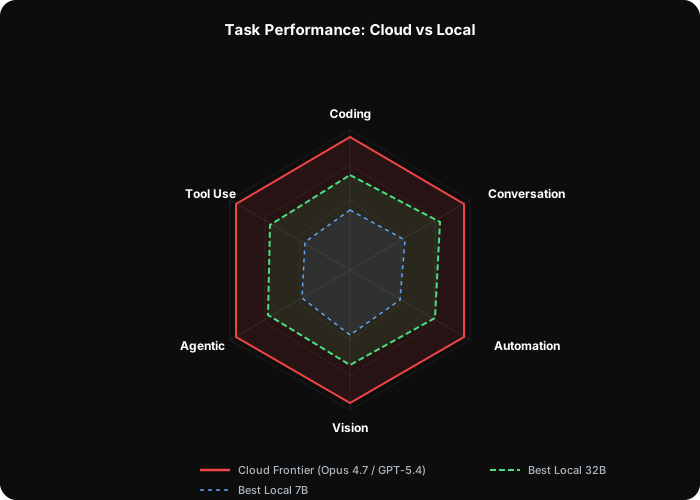
Cloud models dominate coding tasks. Claude Opus 4.7 (released April 2026) scores 64.3% on SWE-bench Pro and 87.6% on SWE-bench Verified - the highest of any model - and leads the MCP-Atlas benchmark for agentic tool use at 77.3%. GPT-5.4 scores 57.7% on SWE-bench Pro and leads computer use with 75% on OSWorld (surpassing the human expert baseline of 72.4%). Gemini 3.1 Pro Preview (released February 2026) holds the #1 spot on WebDev Arena for front-end code generation.
Best local alternatives: Devstral Small 2 (24B), Qwen 3.5-35B-A3B, Gemma 4 31B
Devstral Small 2 scores 68% on SWE-bench Verified - matching models 15x its size like GLM 4.6 (355B) and approaching Qwen 3 Coder Plus (480B) at 69.6%. At 24B parameters, it runs on a single RTX 4090. Gemma 4’s 31B dense model scores 80% on LiveCodeBench v6 and ranks #3 globally on the Arena AI leaderboard. For simpler coding tasks, Gemma 4 E4B (4B) or Phi-4-mini (3.8B) are often sufficient and run on modest hardware.
Verdict: Cloud for production-critical code generation and complex multi-file refactoring. Local for routine coding assistance, prototyping, and when data privacy prevents sending code to external APIs.
Conversation and General Assistance
Cloud winners: Claude Opus 4.7, GPT-5.4
Cloud models are measurably better at nuanced, multi-turn conversation. They maintain context over long exchanges, handle ambiguous requests gracefully, and produce more natural-sounding prose.
Best local alternatives: Gemma 4 31B, Llama 4 Scout, Qwen 3.5-27B
Gemma 4’s 31B dense model is genuinely impressive in conversation - ranked #3 among all open models on the Arena AI leaderboard. For businesses running customer-facing chatbots where data must stay on-premise, this is a viable option. Llama 4 Scout’s 10 million token context window makes it uniquely suited for conversations involving very large documents.
Verdict: Cloud for customer-facing applications where quality directly impacts revenue. Local for internal tools, knowledge bases, and scenarios with strict data residency requirements.
Workflow Automation
Cloud winners: Claude Sonnet 4.6 (with tool use), GPT-5.4
Claude’s structured tool use and function calling are mature and reliable. For automated workflows - parsing documents, extracting data, triggering actions based on analysis - cloud models handle edge cases that trip up smaller models.
Best local alternatives: Qwen 3.5-35B-A3B, Gemma 4 31B, Mistral Large 3
Function calling support in local models has improved dramatically. Ollama’s OpenAI-compatible API supports tool use, meaning local models can participate in the same automation frameworks as cloud models. Gemma 4 was purpose-built for agentic workflows, and the quality gap closes when workflows have well-defined schemas and guardrails.
Verdict: Start with cloud for business-critical automation. Migrate specific, well-tested workflows to local models to reduce costs at scale.
Image Recognition and Vision
Cloud winners: Claude Sonnet 4.6, GPT-5.4, Gemini 3.1 Pro
All major cloud providers offer strong vision capabilities - analysing images, reading documents, understanding diagrams, and extracting structured data from photos.
Best local alternatives: Gemma 4 31B/26B-A4B, Llama 4 Scout/Maverick, Phi-4-multimodal
2026 is the year local vision became practical. Gemma 4, Llama 4, and even the tiny Gemma 4 E2B and E4B models support image and video input. Phi-4-multimodal (5.6B) handles text, vision, and audio in a unified architecture small enough to run on a laptop. For structured tasks (document scanning, form reading, product categorisation), local models now deliver production-quality results.
Verdict: Cloud for complex, nuanced visual analysis. Local for structured, repeatable vision tasks - especially when processing sensitive documents that cannot leave the network.
Agentic Workflows
Cloud winners: Claude Opus 4.7, Claude Sonnet 4.6
Agentic AI - where the model plans, executes multi-step tasks, uses tools, and self-corrects - is where cloud models maintain the largest advantage. Claude Opus 4.7 leads MCP-Atlas at 77.3% (ahead of GPT-5.4 at 68.1% and Gemini 3.1 Pro at 73.9%) with a 14% improvement in multi-step agentic reasoning and a third of the tool errors compared to its predecessor. The reasoning depth required to decompose problems, handle failures, and adapt plans remains demanding.
Best local alternatives: Gemma 4 31B, DeepSeek V4, Qwen 3.5-122B-A10B
Gemma 4 scores 86.4% on the agentic tool-use benchmark (t2-bench) - Google designed it explicitly for agentic workflows. DeepSeek V4’s massive MoE architecture brings strong reasoning to local hardware (though it requires significant GPU resources). For constrained agentic tasks with well-defined toolsets, these models are increasingly viable.
Verdict: Cloud for mission-critical agentic systems. Local for constrained agentic tasks with well-defined toolsets and clear success criteria.
Tool Support and Function Calling
Function calling (also called tool use) is how AI models interact with external systems - calling APIs, querying databases, triggering automations.
| Capability | Cloud Models | Local Models (via Ollama) |
|---|---|---|
| JSON-structured output | Excellent, native | Good, improving rapidly |
| Parallel function calls | Supported (Claude, GPT) | Limited |
| Streaming with tools | Supported | Supported |
| Reliability at scale | High | Variable (model-dependent) |
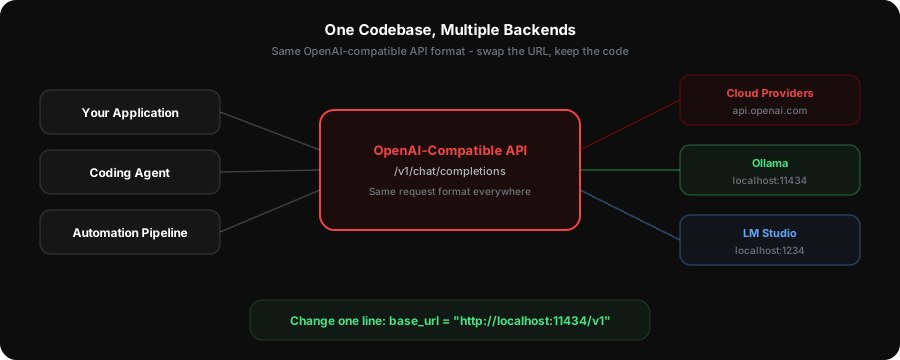
Ollama exposes an OpenAI-compatible API at localhost:11434/v1 that supports function calling. This means tools built for OpenAI or Claude can often work with local models by changing the API base URL.
Streaming Support
Both cloud and local models support token streaming. For user-facing applications, this means responses appear word-by-word rather than waiting for the complete generation.
- Cloud: All major providers support streaming via Server-Sent Events (SSE) over their APIs.
- Local (Ollama): Full streaming support over its REST API and OpenAI-compatible endpoint. The latest Ollama (v0.19+) adds MLX as an alternative backend on Apple Silicon, with early benchmarks showing 1.6x faster prefill and nearly 2x faster decode.
- Local (LM Studio): Streaming via its OpenAI-compatible API server. LM Link (February 2026) adds encrypted remote access via Tailscale.
For building applications, the developer experience is nearly identical between cloud and local streaming implementations.
API Format and Compatibility
This is where local models have made enormous progress.
Ollama exposes two API formats:
1. Native Ollama API at http://localhost:11434/api
2. OpenAI-compatible API at http://localhost:11434/v1/chat/completions
LM Studio exposes:
1. OpenAI-compatible API at http://localhost:1234/v1/chat/completions
Qwen 3.6-Max Preview is notable for supporting both OpenAI and Anthropic API formats natively - a sign of the industry converging on interoperable standards.
This OpenAI compatibility means most tools, libraries, and frameworks that work with OpenAI (or any OpenAI-compatible provider) can use local models with a one-line configuration change:
# Cloud (OpenAI)
client = OpenAI(api_key="sk-...")

# Local (Ollama) - same code, different base URL
client = OpenAI(base_url="http://localhost:11434/v1", api_key="unused")

# Local (LM Studio) - same pattern
client = OpenAI(base_url="http://localhost:1234/v1", api_key="unused")
Coding Agent Support
For developers, the question is not just “which model is best” but “which model works with my tools?”
| Tool | Type | Cloud Models | Local Model Support |
|---|---|---|---|
| Claude Code | CLI agent | Claude (native) | No (Anthropic API only) |
| OpenCode | CLI agent | OpenAI, Claude, Gemini | Yes - OpenAI-compatible API |
| Aider | CLI pair programmer | All major providers | Yes - Ollama, LM Studio |
| Continue.dev | VS Code / JetBrains | All major providers | Yes - Ollama (native), LM Studio |
| Cline / Roo Code | VS Code agent | All major providers | Yes - OpenAI-compatible API |
| Cursor | AI code editor | Claude, GPT (built-in) | No (subscription model) |
Practical recommendation: For coding agent use with local models, Devstral Small 2 (24B) or Gemma 4 31B are the minimum viable models. Smaller models struggle with the complex, multi-step reasoning that agentic coding requires. If your hardware can run it, pair it with Continue.dev or Aider for the best local coding experience.
Hardware Requirements
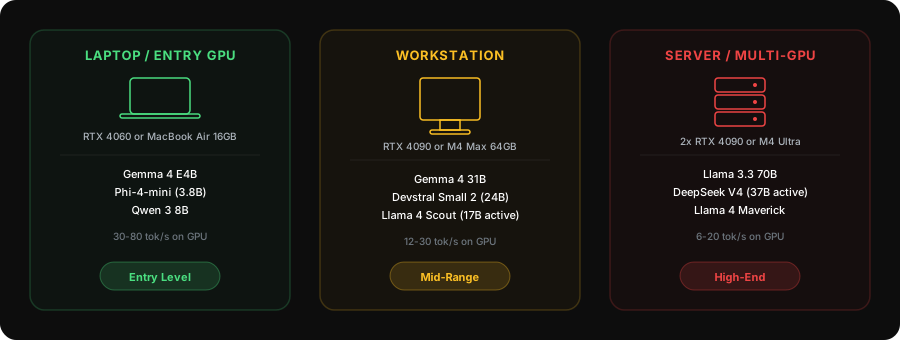
Every model has different hardware demands. The tables below show exactly what you need to run each model comfortably, broken down by the hardware you likely already have or are considering.
All figures assume Q4_K_M quantisation - the most common trade-off between quality and memory. Speeds are approximate and vary by hardware generation and context length.
Small Models (Run on Laptops and Entry Hardware)
These models run on virtually any modern machine. Ideal for prototyping, simple tasks, and mobile deployment.
| Model | Parameters | RAM/VRAM Needed | Minimum Hardware | GPU Speed | CPU Speed |
|---|---|---|---|---|---|
| Gemma 4 E2B | 2B | 2 GB | Any laptop with 8GB RAM | 50-100 tok/s | 20-40 tok/s |
| Phi-4-mini | 3.8B | 3 GB | Any laptop with 8GB RAM | 40-80 tok/s | 15-30 tok/s |
| Gemma 4 E4B | 4B | 3-4 GB | Any laptop with 8GB RAM | 40-70 tok/s | 15-25 tok/s |
| Phi-4-multimodal | 5.6B | 4 GB | 8GB RAM, any GPU (4GB+) | 35-60 tok/s | 10-20 tok/s |
| Qwen 3 8B | 8B | 5-6 GB | 16GB RAM, RTX 3060 (6GB) | 30-60 tok/s | 5-15 tok/s |
Medium Models (Workstation / Gaming PC)
These models need a decent GPU. They deliver strong quality for coding, reasoning, and business tasks.
| Model | Parameters | RAM/VRAM Needed | Minimum Hardware | GPU Speed | CPU Speed |
|---|---|---|---|---|---|
| Phi-4-reasoning | 14B | 8-10 GB | 16GB RAM, RTX 3060 12GB or RTX 4070 | 20-40 tok/s | 3-8 tok/s |
| Phi-4-reasoning-vision | 15B | 9-10 GB | 16GB RAM, RTX 4070 (12GB) | 18-35 tok/s | 3-7 tok/s |
| Devstral Small 2 | 24B | 14-16 GB | 32GB RAM, RTX 4070 Ti Super (16GB) | 15-30 tok/s | 2-5 tok/s |
| Gemma 4 26B-A4B (MoE) | 26B total, 4B active | 4-5 GB (active) | 16GB RAM, RTX 4060 (8GB) | 35-60 tok/s | 10-20 tok/s |
| Qwen 3.5-27B | 27B | 16-18 GB | 32GB RAM, RTX 4090 (24GB) | 15-25 tok/s | 2-5 tok/s |
| Gemma 4 31B (dense) | 31B | 18-20 GB | 32GB RAM, RTX 4090 (24GB) | 12-25 tok/s | 2-4 tok/s |
| Qwen 3 32B | 32B | 18-20 GB | 32GB RAM, RTX 4090 (24GB) | 12-25 tok/s | 2-4 tok/s |
| Qwen 3.5-35B-A3B (MoE) | 35B total, 3B active | 3-4 GB (active) | 16GB RAM, RTX 4060 (8GB) | 40-65 tok/s | 12-22 tok/s |
Note: MoE (Mixture of Experts) models like Gemma 4 26B-A4B and Qwen 3.5-35B-A3B are exceptionally efficient. They have large total parameter counts but only activate a fraction per token, meaning they run on much lighter hardware than their total size suggests.
Large Models (High-End Workstation / Server)
These models need serious hardware but deliver near-cloud quality.
| Model | Parameters | RAM/VRAM Needed | Minimum Hardware | GPU Speed | CPU Speed |
|---|---|---|---|---|---|
| Llama 3.3 70B | 70B | 35-40 GB | 64GB RAM, 2x RTX 4090 or A100 80GB | 10-20 tok/s | 1-3 tok/s |
| Qwen 3 72B | 72B | 36-42 GB | 64GB RAM, 2x RTX 4090 or A100 80GB | 10-18 tok/s | 1-3 tok/s |
| Llama 4 Scout (MoE) | 109B total, 17B active | 12-15 GB (active) | 32GB RAM, RTX 4090 (24GB) | 12-25 tok/s | 2-4 tok/s |
| Qwen 3.5-122B-A10B (MoE) | 122B total, 10B active | 8-10 GB (active) | 32GB RAM, RTX 4090 (24GB) | 15-30 tok/s | 3-6 tok/s |
| Qwen 3 235B-A22B (MoE) | 235B total, 22B active | 14-16 GB (active) | 32GB RAM, RTX 4090 (24GB) | 10-20 tok/s | 2-4 tok/s |
| Llama 4 Maverick (MoE) | 400B total, 17B active | 15-20 GB (active) | 64GB RAM, 2x RTX 4090 (48GB total) | 8-15 tok/s | 1-2 tok/s |
| DeepSeek V4 (MoE) | ~1T total, 37B active | 22-25 GB (active) | 64GB RAM, 2x RTX 4090 or A100 80GB | 6-12 tok/s | tok/s |
Llama 4 Scout is a standout: 109B total parameters but only 17B active, meaning it fits on a single RTX 4090 while offering quality that rivals much larger dense models. It also has a 10 million token context window.
Apple Silicon: The Unified Memory Advantage
Apple’s M-series chips share memory between CPU and GPU. This is a genuine competitive advantage for local LLM inference - the full system RAM is available as GPU memory.
| Apple Chip | Unified Memory | Best Model Fit | Approx. Speed |
|---|---|---|---|
| M1/M2/M3/M4 | 8-16 GB | Gemma 4 E4B, Phi-4-mini (3B-4B) | 20-40 tok/s |
| M3/M4 Pro | 18-36 GB | Devstral 2, Gemma 4 31B (24B-32B) | 10-25 tok/s |
| M3/M4 Max | 36-128 GB | Llama 3.3 70B, Llama 4 Scout (70B+) | 8-15 tok/s |
| M2/M4 Ultra | 64-192 GB | DeepSeek V4, Llama 4 Maverick (100B+) | 5-12 tok/s |
- Memory bandwidth: M4 Max delivers 546 GB/s. RTX 4090 delivers 1,008 GB/s but is limited to 24GB VRAM. A Mac with 64GB unified memory can run models that would require multiple GPUs on a PC.
- Ollama MLX backend (v0.19+, March 2026): 1.6x faster prefill and 2x faster decode on Apple Silicon compared to the default llama.cpp path.
Recommended PC Builds
| Tier | Target Models | GPU | RAM | CPU | Storage |
|---|---|---|---|---|---|
| Entry | 7B-14B (Qwen 3 8B, Phi-4) | RTX 4060 Ti 16GB | 32 GB DDR5 | Ryzen 5 7600 / i5-14400 | 1TB NVMe |
| Mid-range | 24B-32B (Gemma 4 31B, Devstral 2) | RTX 4090 24GB | 64 GB DDR5 | Ryzen 7 7700X / i7-14700K | 2TB NVMe |
| High-end | 70B+ (Llama 3.3, DeepSeek V4) | 2x RTX 4090 or A6000 48GB | 128 GB DDR5 | Ryzen 9 7950X / i9-14900K | 4TB NVMe |
Installation Guide
Ollama
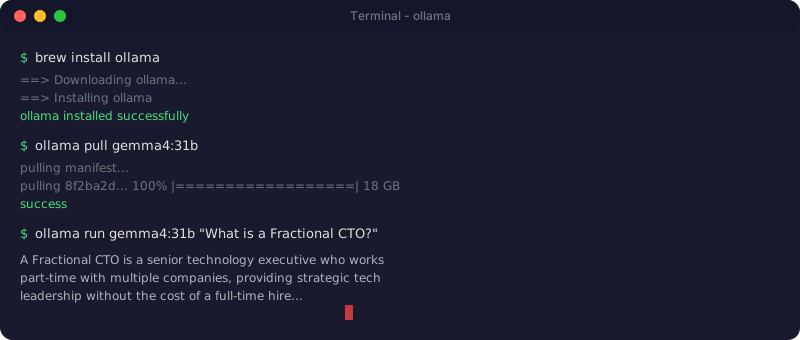
macOS:
# Download and install from ollama.com, or use Homebrew:
brew install ollama

# Start the service
ollama serve

# Pull and run a model (Gemma 4 31B - latest, top-3 open model)
ollama pull gemma4:31b
ollama run gemma4:31b
Linux (Ubuntu):
# One-line installer
curl -fsSL https://ollama.com/install.sh | sh

# The service starts automatically. Pull a model:
ollama pull gemma4:31b
ollama run gemma4:31b

# To run as a systemd service on boot:
sudo systemctl enable ollama
Windows:
# Download the installer from ollama.com and run it, or use winget:
winget install Ollama.Ollama

# After installation, Ollama runs as a background service.
# Open a terminal and run:
ollama pull gemma4:31b
ollama run gemma4:31b
Verify the API is running:
curl http://localhost:11434/v1/models
LM Studio
- Download from lmstudio.ai for your platform (Windows, macOS, Linux)
- Install and launch the application
- Search for a model (e.g., “Gemma 4 31B” or “Devstral Small 2”) in the Discover tab
- Download the GGUF quantisation you want (Q4_K_M is a good default)
- Load the model and start chatting - JIT model loading (new in 2026) lets you switch models without restarting
- To use as an API server: click “Developer” tab and start the local server (runs on
localhost:1234) - For remote access: use LM Link (February 2026) with Tailscale for encrypted access from other machines
Using a Local Model with Python
from openai import OpenAI

# Point at your local Ollama or LM Studio server
client = OpenAI(
    base_url="http://localhost:11434/v1",  # Ollama
    api_key="not-needed"
)

response = client.chat.completions.create(
    model="gemma4:31b",
    messages=[
        {"role": "system", "content": "You are a helpful coding assistant."},
        {"role": "user", "content": "Write a Python function to validate UK postcodes."}
    ],
    stream=True
)

for chunk in response:
    if chunk.choices[0].delta.content:
        print(chunk.choices[0].delta.content, end="")
Running LLMs on a Mobile Phone
Yes, you can run language models on a modern smartphone. The experience is surprisingly usable for small models.
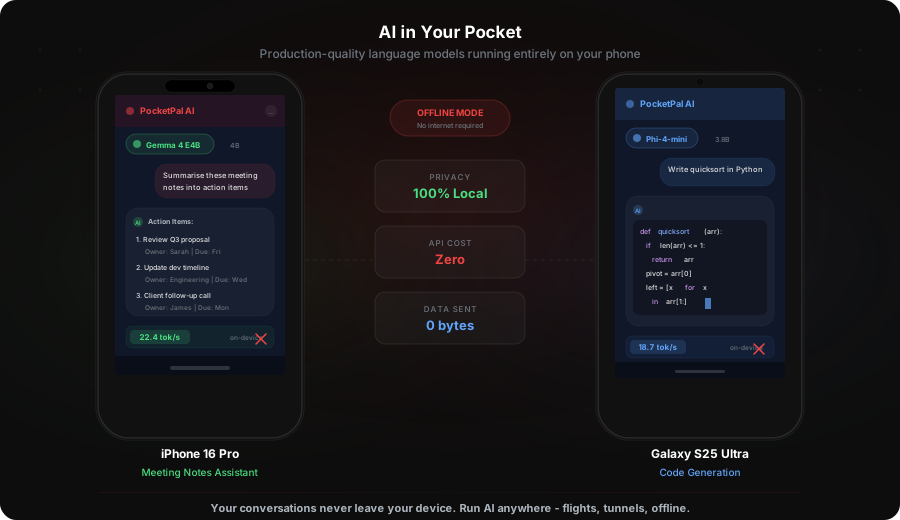
What Works on Mobile
| Device | RAM | Best Model Size | Approximate Speed |
|---|---|---|---|
| iPhone 15 Pro / 16 Pro | 8 GB | 3B-4B (comfortably), 7B Q4 (tight) | 10-25 tok/s |
| Samsung Galaxy S24/S25 Ultra | 12 GB | 7B Q4 (comfortably) | 8-20 tok/s |
| Pixel 9 Pro | 16 GB | 7B-8B Q4 | 10-20 tok/s |
| iPad Pro M4 | 16 GB | 14B Q4 | 15-30 tok/s |
Demo: A Local AI Assistant on Your Phone
Step 1: Install PocketPal AI from the App Store or Google Play. It is free and open-source.
Step 2: Download a model. We recommend starting with Gemma 4 E4B or Phi-4-mini (3.8B) - both fit comfortably in mobile memory and respond quickly. PocketPal integrates directly with Hugging Face for model discovery.
Step 3: Start chatting. The model runs entirely on your device. No internet connection required after the initial download.
What you can achieve: - Offline Q&A - answer questions on flights, in tunnels, in areas with no signal - Document summarisation - paste text and get summaries without sending data to the cloud - Quick code snippets - generate simple scripts and functions on the go - Translation - multilingual models handle basic translation offline - Privacy-first notes - dictate and process sensitive meeting notes locally
What you cannot expect: - Complex multi-step reasoning (use a cloud model for that) - Long document processing (mobile context windows are limited by memory) - Speed comparable to a desktop GPU - Image analysis on most mobile models (Gemma 4 E4B does support images, but performance varies)
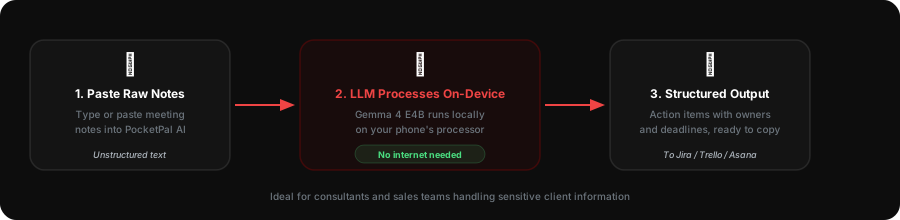
Practical example - a prototype meeting notes assistant:
- Install PocketPal AI with Gemma 4 E4B
- After a meeting, type or paste your raw notes
- Ask: “Summarise these notes into action items with owners and deadlines”
- The model processes everything locally - nothing leaves your phone
- Copy the structured output into your project management tool
This is a genuine use case for sales teams, consultants, and anyone who handles sensitive client information and cannot risk it passing through a third-party API.
Choosing the Right Approach for Your Business
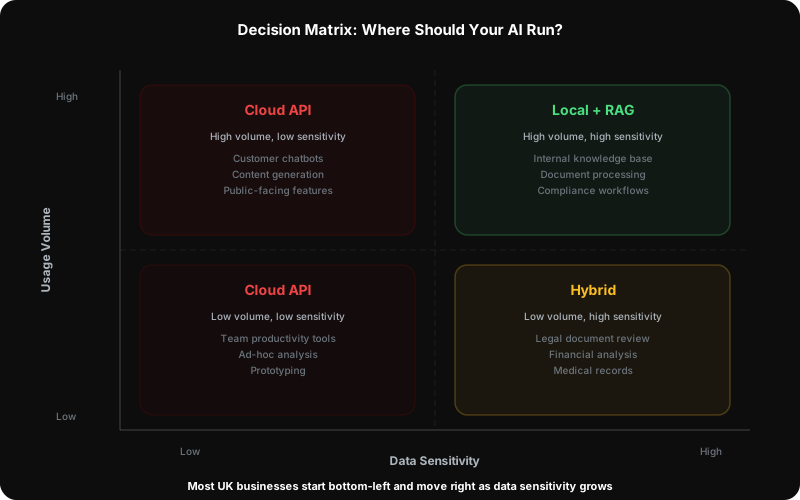
The decision between local and cloud AI is not binary. Most businesses will use both. The question is which workloads go where.
Choose Cloud When:
- Quality is non-negotiable - customer-facing applications, critical code generation, complex analysis
- You need frontier capabilities - Claude Opus 4.7’s agentic coding, GPT-5.4’s computer use, Gemini’s million-token context
- Speed to market matters - no hardware to procure, no models to manage, immediate access
- Your team is small - managing AI infrastructure is an overhead; cloud lets you focus on the application
Choose Local When:
- Data cannot leave your network - GDPR compliance, client confidentiality, regulated industries (legal, healthcare, financial services)
- Cost at scale is a concern - high-volume API calls add up; a one-time hardware investment can be cheaper over 12-18 months
- You need offline capability - field operations, restricted environments, unreliable connectivity
- You want to experiment freely - no API costs during development, testing, and prototyping
- Latency matters - local inference avoids network round-trips (important for real-time applications)
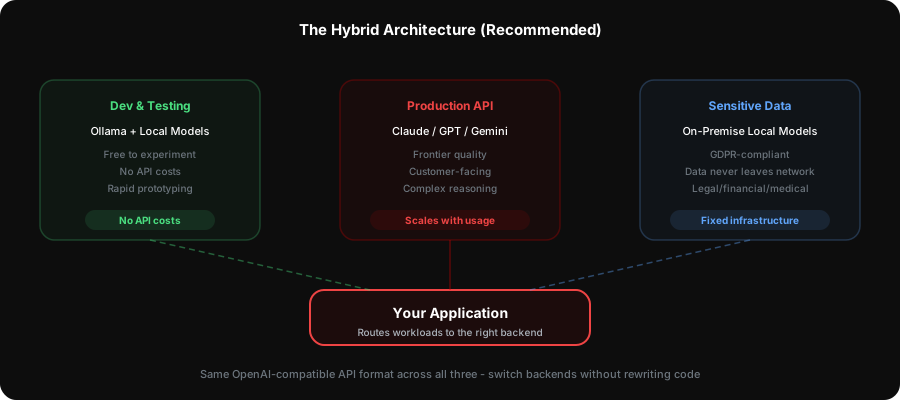
The Hybrid Approach (What We Recommend)
For most UK businesses, the pragmatic path is a hybrid architecture:
- Prototype with cloud models - use Claude or Gemini to validate the idea and establish quality baselines
- Identify cost-sensitive or privacy-sensitive workloads - move these to local models once the workflow is proven
- Keep frontier tasks on cloud - complex reasoning, agentic workflows, and quality-critical generation
- Use local models for development and testing - save API costs during the build phase, switch to cloud for production
This approach minimises risk, controls costs, and keeps your options open as the local model landscape rapidly improves.
What Most Guides Miss: Business Considerations
Data Privacy and GDPR
For UK and EU businesses, where your data is processed matters legally. Cloud AI providers process your data on their servers - typically in the US, though European options exist (Mistral’s EU infrastructure, Azure’s UK regions). Local LLMs process everything on your hardware, which simplifies GDPR compliance significantly.
If your business handles personal data, medical records, legal documents, or financial information, the compliance benefit of local processing can outweigh the quality gap.
Total Cost of Ownership
A common mistake is comparing API costs to hardware costs without accounting for the full picture:
Cloud costs: Per-token pricing that scales linearly with usage. For a team of 10 developers using AI coding assistance heavily, monthly costs add up quickly. Pricing changes frequently - check each provider’s current rates before budgeting.
Local costs: One-time hardware investment plus electricity, maintenance, and the engineering time to set up and manage the infrastructure. Break-even versus cloud typically occurs at 6-18 months depending on usage volume, but this varies significantly by workload.
Model Context Protocol (MCP) and Enterprise Integration
Anthropic’s Model Context Protocol is emerging as a standard for connecting AI models to enterprise data sources - databases, file systems, APIs, and business tools. MCP works with both cloud and local models, meaning your integration architecture can be model-agnostic.
For businesses planning AI integration, designing around MCP-compatible tooling protects your investment regardless of whether you later shift workloads between cloud and local models.
Retrieval-Augmented Generation (RAG)
RAG is the most practical way to make AI useful for your specific business. Instead of fine-tuning a model (expensive, complex, fragile), RAG retrieves relevant documents from your knowledge base and includes them in the prompt.
This works identically with cloud and local models. A local RAG pipeline (Ollama + a vector database like ChromaDB or Qdrant) gives you a private, on-premise knowledge assistant that answers questions using your company’s actual documents.
Fine-Tuning: When and Why
Fine-tuning (training a model further on your own data) is occasionally necessary but often over-prescribed. Consider it when: - Your task requires very specific formatting or domain vocabulary consistently - RAG alone does not capture the nuanced patterns in your data - You have thousands of high-quality examples to train on
For most business use cases, prompt engineering + RAG delivers 90% of the benefit at 10% of the cost and complexity.
Summary: The Decision Matrix
| Factor | Cloud Models | Local Models |
|---|---|---|
| Quality (frontier tasks) | Superior | Good and closing fast |
| Quality (routine tasks) | Excellent | Often sufficient (Gemma 4 31B, Devstral 2) |
| Data privacy | Requires trust in provider | Complete control |
| Cost (low volume) | Pay-as-you-go, cheaper | Hardware investment upfront |
| Cost (high volume) | Scales linearly, expensive | Fixed cost after hardware |
| Setup complexity | Minimal (API key) | Moderate (hardware + software) |
| Maintenance | None (provider handles it) | Your responsibility |
| Offline capability | No | Yes |
| GDPR compliance | Complex | Straightforward |
| Coding agents | Full support | Growing (Continue.dev, Aider, Cline) |
| Agentic workflows | Strong (Opus 4.7 leads) | Emerging (Gemma 4, DeepSeek V4) |
| Vision/multimodal | Excellent | Now practical (Gemma 4, Llama 4, Phi-4) |
| Mobile deployment | N/A | Yes (3B-8B models on phone) |
If You Are Here Because of Confidentiality
If what brought you to this page was a question about whether company or client data is safe in AI tools, start with is it safe to put company data into AI, which covers the questions to put to a vendor and the one-page rule most businesses need. Come back here when the answer turns out to be that the material cannot leave your network - that is when the local option below stops being a hobby and becomes the sensible architecture. Firms operating under professional privilege will also want our professional services page.
How We Help
At Egon Expert, we help businesses navigate exactly this decision. As a Fractional CTO consultancy with hands-on AI engineering experience, we do not sell AI products - we help you build the right AI architecture for your specific needs:
- AI Readiness Assessment - evaluate your current workflows and identify where AI delivers genuine ROI
- Architecture Design - choose the right mix of cloud and local models for your data sensitivity, budget, and performance requirements
- Implementation - build production-ready AI pipelines, from RAG systems to agentic workflows
- Team Enablement - train your engineering team to work with AI tools effectively, from coding agents to custom integrations
The AI landscape moves fast. Having an experienced technology advisor who understands both the capabilities and the limitations means you invest in what works, not what is hyped.
Book a free consultation to discuss your AI strategy.
References
- Anthropic - Claude Opus 4.7 announcement: Latest Claude model release (April 2026).
- Google - Gemma 4 release: Most capable open models under Apache 2.0 (April 2026).
- OpenAI - GPT-5.4 model: State-of-the-art coding and computer use.
- Meta AI - Llama 4 Scout and Maverick: First open-weight multimodal MoE models.
- Alibaba - Qwen 3.6-Max Preview: Top-6 coding benchmarks, 256K context.
- Mistral AI - Devstral Small 2: 24B coding model beating larger alternatives.
- Ollama - Local LLM runner: 162K+ GitHub stars, MLX backend for Apple Silicon.
- LM Studio - Desktop LLM application: GUI with LM Link remote access (2026).
- PocketPal AI - Mobile LLM app: Free, open-source, iOS and Android.
- Anthropic - Model Context Protocol: Open protocol for AI-enterprise integration.